
Perry Weather
Perry Weather, Inc.Weather
3.123.00 Reviews
- Version
- 4.8.0
- Installs
- 10.00K
- Age Rating
- Everyone
Screenshots
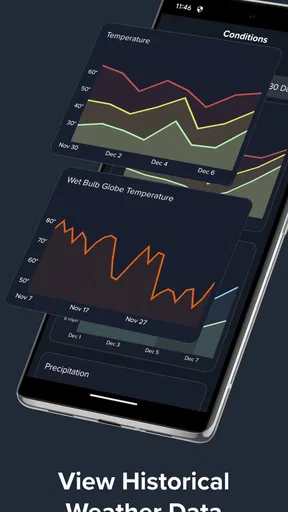
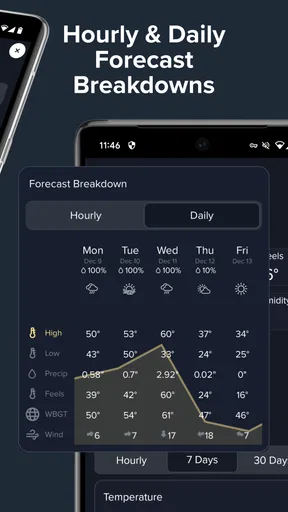
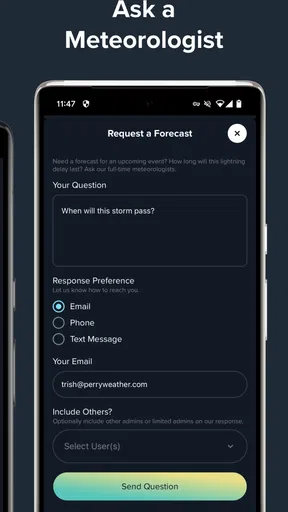
Our Review of Perry Weather
 Analysis by Appyee
Weather apps usually compete by showing more maps, more forecasts, and more numbers. Perry Weather takes a narrower and more practical route: it focuses attention on lightning strikes, precipitation, weather conditions, and alerts. After spending time with it, I see the appeal immediately. This is less about casually checking whether the weekend will be pleasant and more about deciding whether an outdoor activity should continue, pause, or move indoors.
That focus makes it interesting for people who manage fields, outdoor work, sports, events, or simply want a direct warning when storms become a real concern. It is a free weather app from Perry Weather, Inc., available to everyone and compatible with Android devices running version 7.0 or later. The current release is 4.8.0, and the app has reached over ten thousand installs. Its average rating sits at 3.1 from around forty ratings, so public reaction is mixed rather than overwhelmingly positive.
How Perry Weather feels in everyday use
The first thing I noticed is that Perry Weather is built around timely awareness instead of long reading sessions. A conventional weather app often leads with hourly temperatures, daily highs, wind, humidity, and a broad forecast. Those details are useful, but they can bury the one question that matters during an outdoor activity: is dangerous weather approaching right now?
Perry Weather puts the emphasis closer to that decision. Lightning and precipitation are not treated as minor extras. They are the reason to open the app in the first place. I found that especially valuable when thinking about activities where a forecast from several hours ago is no longer enough. A morning prediction may say little about what is happening over a playing field, work site, or park later in the day.
That does not make it a universal replacement for a full weather service. If I want a detailed multi-day outlook, climate comparisons, pollen information, or a broad collection of lifestyle indicators, I would normally choose a more general weather app. Perry Weather makes more sense as a focused tool that helps me react to changing conditions.
The distinction is important because expectations can easily become unrealistic. A person downloading it for a simple daily temperature check may find the experience more specialized than expected. Someone who spends time outdoors and needs to pay attention to storm development may appreciate that specialization much more.
A useful role beside a standard forecast app
I would not treat Perry Weather as the only weather source on my phone without first understanding my routine. For commuting, clothing choices, and planning a trip several days ahead, a mainstream forecast app is usually more convenient. It tends to offer broader context and a more familiar overview.
For short-term outdoor decisions, however, Perry Weather has a clearer purpose. I can imagine checking a normal forecast in the morning, then using this app later when clouds build or rain begins to threaten an activity. That two-app workflow is not a weakness by itself. It reflects the difference between planning and monitoring.
My main practical takeaway is to use Perry Weather as an alert-focused companion, not automatically as a complete replacement for every weather tool. That approach avoids disappointment and gives the app room to do what it appears designed to do well.
Who benefits most from the focused design
The strongest audience includes people responsible for outdoor groups or spaces. A coach deciding whether practice should continue, a site supervisor watching conditions around outdoor work, or an event organizer monitoring a venue can benefit from a tool centered on lightning and precipitation rather than decorative forecast details.
It can also suit families who spend a lot of time at parks, campsites, or sports grounds. The value is not that the app makes the decision for me. The value is that it can keep weather risk visible while I am busy with something else. That is a different need from casually checking tomorrow’s temperature.
People who prefer a rich visual forecast may feel less satisfied. If the main reason I open a weather app is to compare several forecast models, inspect extensive historical information, or browse many layers, I would look elsewhere first. Perry Weather’s focused identity is helpful only when those priorities match my own.
A realistic outdoor scenario
Imagine I am helping run an afternoon youth sports session. The morning forecast looks manageable, but by mid-afternoon the sky darkens and rain begins nearby. Rather than relying on a general forecast that has not changed in a meaningful way, I can check Perry Weather for the conditions that matter most to the field: lightning activity and precipitation.
If an alert arrives while I am organizing equipment, I do not need to keep refreshing a screen every few minutes. I can pause the session, move people to a safer location, and then reassess later. The app does not remove the need for sensible safety procedures, but it can reduce the chance that I overlook a worsening situation while concentrating on logistics.
The same workflow applies to an outdoor job. A worker may not need a beautifully designed forecast page; they need a timely reason to stop, wait, or resume. In that context, a focused alert can be more useful than a large amount of unrelated weather information.
What the current release tells me about its direction
The current version, 4.8.0, suggests that Perry Weather is an established product rather than a brand-new experiment. It was released on August 28, 2015, so the app has had time to develop beyond a first concept. I would still separate that history from assumptions about future improvements. A version number shows where the product is now, not what the next update will deliver.
What I can reasonably say about its evolution is that the app remains centered on real-time weather awareness, especially lightning, precipitation, and alerts. That continued focus is meaningful. Instead of drifting into a general-purpose weather dashboard, Perry Weather appears to retain a clear identity built around immediate outdoor conditions.
For existing users, that continuity can be reassuring. If someone installed it because storm monitoring was the priority, the current release still speaks to that original need. People are not forced to learn an entirely different product concept simply because the app has matured.
At the same time, a focused identity can make progress harder to notice. Users may expect every new release to bring visible interface changes, richer maps, or more detailed forecasting. If the core value remains alerting and monitoring, improvements may feel subtle even when they make the experience more dependable. I would judge the app by how easily it supports decisions, not by how many screens or controls it offers.
What changes mean for someone already using it
An existing user should approach the current release as a refinement of a specialized tool, not as a completely new weather platform. The most important question is whether the alert-centered workflow still fits the user’s needs. If it does, staying with the app makes sense because familiarity matters when conditions are changing quickly.
That familiarity can be especially valuable for people who check weather repeatedly at the same kinds of locations. A coach, supervisor, or event organizer may develop a simple routine: review conditions before activity, keep alerts available during the activity, and check again before allowing people to return outside. A consistent tool makes that routine easier to remember.
New users should spend a little time learning how they personally want to use alerts before depending on them during a high-pressure situation. I would not wait until a storm is already overhead to discover whether the app’s presentation suits me. A calm-day trial helps reveal whether the information is easy to notice and whether the app fits my habits.
There is also a human factor. Weather alerts are useful only when someone sees them and knows what action to take. A notification is not a safety plan. For group activities, I would pair the app with a clear rule about when to stop and where everyone should go. That is one of the most important distinctions between a helpful weather tool and a complete emergency procedure.
Three practical habits that improve its usefulness
First, I would check Perry Weather before leaving for an outdoor activity and again shortly before it begins. The second check matters because conditions can change while travel and setup are taking place. This simple two-stage routine is more useful than opening the app once and assuming the morning outlook will remain accurate all day.
Second, I would keep the app in a dedicated weather folder or on a home-screen page used for outdoor planning. That may sound minor, but a monitoring app loses value when it takes too long to find during a changing situation. Quick access encourages short, regular checks instead of occasional guesses.
Third, I would use the app to support a decision threshold rather than to debate every weather detail. For example, if lightning activity or heavy precipitation makes the activity unsafe, I would act on the established rule instead of waiting for perfect certainty. This is a better use of an alert-focused app than repeatedly comparing small changes in temperature or cloud cover.
A fourth habit is worth adding for people managing others: communicate alerts to the group in plain language. Perry Weather can help one person notice conditions, but a team still needs a shared response. The person checking the app should know who has authority to pause the activity and how that decision reaches everyone.
Where the experience may still feel limited
The biggest limitation is the same feature that gives the app its identity: specialization. Users wanting a complete weather picture may find themselves switching to another service for information outside lightning, precipitation, and immediate alerts. That extra step is acceptable for some people, but irritating for anyone who wants one app to cover every weather question.
The mixed public rating also tells me to keep expectations measured. An average of 3.1 does not explain every individual complaint or success, but it does suggest that the experience will not satisfy everyone equally. I would be especially cautious if reliable weather monitoring is central to a professional responsibility and I have not yet tested the app in my own environment.
Another trade-off is the difference between information and interpretation. A weather alert can tell me that conditions deserve attention, but it cannot understand the layout of a venue, the age of participants, the availability of shelter, or the consequences of delaying work. I still need judgment. Perry Weather can support a decision, but it should not be treated as an automatic all-clear system.
People who want extensive customization should also evaluate the app patiently. A focused design can be quicker, but it may not offer the same breadth of views or controls found in larger weather platforms. I would choose it for clarity around storm-related conditions, not because I expect an enormous collection of forecasting tools.
Privacy, cost, and suitability for a family phone
Perry Weather is free, which makes trying it low-risk from a budget perspective. The Everyone content rating also makes it suitable for a broad audience, including families looking for a weather tool that does not target mature users. Free access is particularly useful when I want to test whether the app fits a specific outdoor routine before committing to it.
That said, free does not automatically mean perfect for every phone or household. I would still make sure the person responsible for checking alerts understands how the app fits into the family’s plans. A child may be able to open a weather app, but an adult should remain responsible for interpreting storm conditions and making safety decisions.
Compatibility with Android 7.0 or later covers many older devices, which is helpful if an organization has a spare phone or a less recent handset available for monitoring. I would still test the app on the actual device that will be used outdoors. A tool that works well in theory is less useful if the screen is hard to read, notifications are easy to miss, or the phone is rarely carried by the responsible person.
What I would watch before relying on it heavily
I would pay attention to how consistently alerts fit my location and routine, how quickly I notice them, and whether the information is clear enough to support a quick decision. Those are more important to me than cosmetic changes. A weather app can look polished and still be inconvenient when I am supervising people or working outside.
I would also watch how the product balances its specialist role with the expectations of modern weather users. Keeping the focus on lightning and precipitation is sensible, but the app must remain easy to understand for newcomers who may not already know why those signals matter. Clear presentation is essential when the audience includes both casual users and people with operational responsibilities.
For existing users, future progress would be most valuable if it improved confidence without adding unnecessary complexity. For new users, the best sign would be a workflow that becomes obvious after only a short trial. I would rather see a small number of dependable, relevant actions than a crowded dashboard that slows me down.
My recommendation after using it
I recommend Perry Weather to readers who need a practical way to keep an eye on lightning, precipitation, and changing outdoor conditions. Its free price, broad age suitability, and support for older Android versions make it easy to test. The app’s strongest quality is its purpose: it concentrates on the information that can affect whether an outdoor plan continues safely.
I would skip it as my only weather app if I mainly want long-range planning, detailed everyday forecasts, or a broad set of lifestyle features. In that case, a conventional weather service will probably be more convenient. I would also avoid depending on any alert app without a separate safety procedure for the people or work involved.
For me, Perry Weather works best as a focused companion. I can use a regular forecast app to plan, then turn to this one when the question becomes immediate: is precipitation developing, is lightning a concern, and should the outdoor activity pause? That clear division of responsibilities gives the app a useful place on my phone.
It is not the most universal weather experience, and its 3.1 average rating means I would test it rather than assume it will suit everyone. Still, if storm awareness is the part of weather information I care about most, Perry Weather offers a straightforward reason to keep it installed. Its value comes from helping me notice changing outdoor risk at the moment a forecast alone is no longer enough.
Verdict
Strengths of Perry Weather
- Real-time weather alerts help users prepare for dangerous conditions.
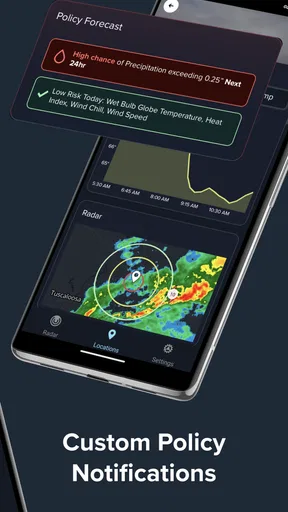
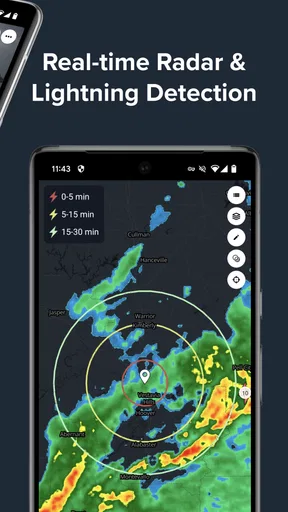
- Clear radar and forecast views make information easy to understand.
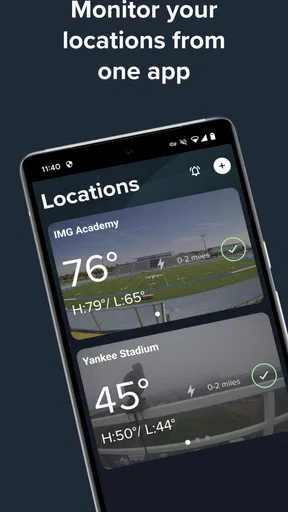
- Useful for tracking weather across multiple locations.
- Severe-weather notifications can support faster safety decisions.
- Designed for outdoor operations, events, and workplace planning.
Limitations of Perry Weather
- Some features may require an account or organizational access.
- Advanced tools can feel unnecessary for casual weather checking.
- Alerts depend on location permissions and reliable internet access.
- Forecast accuracy may vary by region and changing conditions.
- The interface may take time to learn for first-time users.
Similar Picks in This Category
View All
Weather - By Xiaomi
Xiaomi Inc.4.1

Weather & Radar Forecast
WetterOnline4.8

Weather
OneLouder Apps4.6

AccuWeather: Weather Radar
AccuWeather3.6

The Weather Channel - Radar
The Weather Channel4.6

1Weather Forecasts & Radar
OneLouder Apps4.3
Frequently Asked Questions
What is Perry Weather and who is it designed for?
Perry Weather is a weather monitoring and safety platform designed primarily for organizations managing outdoor activities, facilities, and large workforces. It provides weather forecasts, real-time conditions, alerts, and monitoring tools that can help users respond to lightning, extreme heat, heavy rain, strong winds, and other potentially dangerous conditions. It is especially relevant for schools, sports venues, construction companies, municipalities, and event organizers.
What features does the Perry Weather app provide?
The app can provide access to current weather conditions, forecasts, severe weather notifications, and location-based monitoring. Depending on the account and organization using the service, users may also receive lightning alerts, heat-related warnings, evacuation or shelter notifications, and updates connected to an organization’s safety procedures. Some features may be managed centrally by an administrator, so the exact tools available can vary between users and subscriptions.
Does Perry Weather send real-time severe weather and lightning alerts?
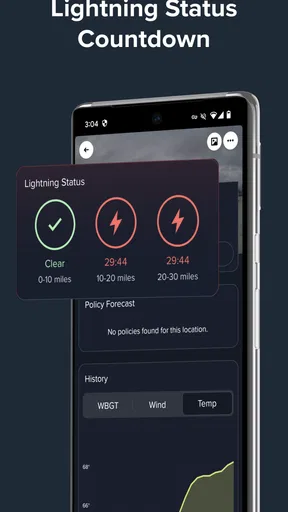
Perry Weather is built to help users monitor changing weather conditions and receive timely safety notifications, including alerts related to lightning and other hazardous events. However, alert speed and availability can depend on enabled permissions, internet connectivity, device settings, selected locations, and the organization’s configuration. The app should be treated as a safety support tool, not as a replacement for official emergency instructions or local authorities.
Is Perry Weather free to download and use?
Whether Perry Weather is free for you depends on how the service is provided by your organization. Some users may access the app through an employer, school, venue, sports program, or other institution that maintains a paid account. Downloading an app does not necessarily mean every feature is available without an account or invitation. Before installing, check whether your organization supports Perry Weather and whether login credentials are required.
What permissions and setup does Perry Weather require?
To work effectively, Perry Weather may require permissions such as notifications, location access, and an internet connection. Notifications are important for receiving weather and safety alerts, while location access can help display relevant conditions for a selected area. Users should also keep the app updated and avoid restricting background activity if alerts are essential. Available permissions and setup requirements may differ according to the device, operating system, and administrator settings.
